Confused on DMX PAR light modeling / capabilities in xlights

halfpress

New elf
Joined
Dec 2, 2025
Messages
7
Hello!

I'm hoping I'm missing a key step here because, conceptually, I see all kinds of ways things would seemingly be abstracted in the manner I would expect... but I'm not managing to find it so far.

I have a dozen DMX PAR lights that are, effectively, nine DMX channels for their functionality. DMX channels 2, 3, & 4 define the red, green and blue. DMX channel 1 is the "total dimmer". The remaining channels are various other built-in functions like strobing behaviors and other things I don't need. As a simple example, full red would be:

r/xlights - Confused on DMX PAR light modeling / capabilities
I have my lights functioning and I can individually control them in the manner above.

What I'm struggling to figure out is whether I can apply effects at a higher level in any simple manner. For instance, can I define them as a string like I would pixels and apply an effect across them like bars or a butterfly or... anything? Or do I have to individually program every DMX light in an extremely manual fashion?

Example: I tried defining them as a string (the xlights manual says DMX flood lights can be strings)... but I get tripped up in the assumptions it makes that they are simply three channels each and that's seemingly not mapping onto the underlying DMX channels properly (it assumes, say, 36 channels for all of the lights rather than 108). Only when I define them individually as nine channels each can I do anything with them and only individually via the DMX effect.

I should note that I was previously using LightKey on the Mac which has done a pretty fantastic job of managing these lights in past years. But this year I decided to mix in thousands of pixels (mega tree, etc) and wanted to move to using xlights to control everything including my DMX lights. I'm finding the pixels to be fairly logical and straightforward, but I'm banging my head on the wall doing simple things with the DMX lights anything like how I did it with LightKey.

I keep feeling like I'm missing something and hoping there is an abstraction between light specifics and more complex effects and not everything is done through the one DMX effect on a per light basis.

Appreciate any help on the topic!
 
There are a couple simple ways to go over before we resort to the ideas below.
1. Some DMX floods can be set to simpler modes with less channels ... skip the dimmer and all the interesting control modes
2. If you are keeping all the channels, set up the model with the R, G, B, dimmer, etc. known. If you do that, the "ON" effect (and all the others) will just work because xLights will auto set the dimmer if the R, G, B are not zero.

What I'm struggling to figure out is whether I can apply effects at a higher level in any simple manner. For instance, can I define them as a string like I would pixels and apply an effect across them like bars or a butterfly or... anything? Or do I have to individually program every DMX light in an extremely manual fashion?
If you are going to use the DMX effect to control them all, one approach is to put them in a group and do "per model default" as the render style when you apply DMX effects to that group. (This allows strobe, good control over UV or other interesting colors, etc.)

Example: I tried defining them as a string (the xlights manual says DMX flood lights can be strings)... but I get tripped up in the assumptions it makes that they are simply three channels each and that's seemingly not mapping onto the underlying DMX channels properly (it assumes, say, 36 channels for all of the lights rather than 108). Only when I define them individually as nine channels each can I do anything with them and only individually via the DMX effect.

Yes, the string assumptions are a bit tough to live with. But you can make a string of nodes or shadow with a string... this falls apart quickly if you are using multiple controllers though.

I keep feeling like I'm missing something and hoping there is an abstraction between light specifics and more complex effects and not everything is done through the one DMX effect on a per light basis.
Definitely try setting up all the channels in the model definition and hopefully it will work in a very simple way from that point.
 
@merryoncherry Thank you! You triggered the thinking that got be on track finally.

I had, in fact, tried DMX General before and had even set RGBW values to the channels, but I was never getting any light when testing them. Your mention of them setting the level of the dimmer automatically got me thinking... so this time I defined one, but I declared one fixed channel and set the dimmer channel (#1) to 255... basically, locking it on to full value in all cases (which seems fine for my needs).

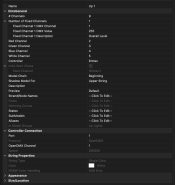
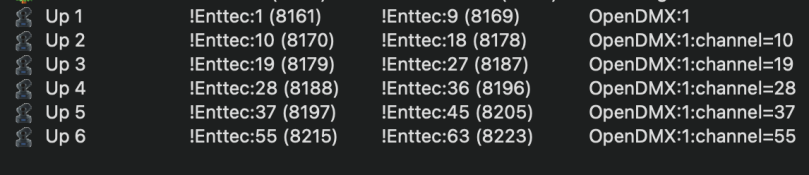
Lo and behold, that worked. So perhaps it doesn't set that level automatically as you mentioned and my override is needed in this config? Or did I miss something? Here is how one PAR light is defined now and the others are identical, just with their proper DMX start channels:

Screenshot 2025-12-02 at 11.54.00 AM.png

Screenshot 2025-12-02 at 11.56.09 AM.png

Whatever the case, I finally have lights that are starting to respond to Effects to a degree. I even made a group of six of them (the ones pointing upward in my configuration), set the Render Style as you indicated (something I had seen mentioned in a video and tinkered with previously, but I was failing in other ways, so it just added confusion at the time). I can control the lights in the group now as well... though it's applying every effect equally since it doesn't think of them as a string.

So now I'm trying to define them as a string - which fits my physical layout - in the hopes of creating effects that sweep across the line properly in terms of color and intensity. I'm still hitting walls, though, trying to create that association. I get the idea is for my string to be sort of "virtual", associating its various nodes with specific PAR lights... but not quite found my path there yet. This is all on one controller (it's a Enttec OpenDMX USB interface hanging off a Raspberry Pi running FPP that is, at the moment, in Remote/Bridge mode to xlights on my Mac), so I'm not worried about splitting concerns that would add complexity.

I have done a shadow before - the mega tree I have is split between two DigOcta-8 controllers so keep the pixel count at a higher frame rate. So my tree is split left and right and all is working well. But I haven't seen a way yet to define the nodes of a string in the same manner that my tree did. The tree is made of multiple strings and I can declare a start channel per string in tree model that relies on the two shadows half trees, but I don't see node-level settings in that manner for a string. Hope that makes sense. :)

Think I'm almost there and learning more about xlights behavior and concepts as I go... just not QUITE there yet. Any help appreciated!

Thanks!
 
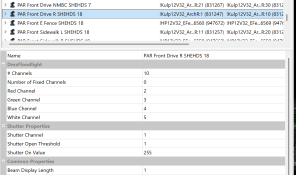
Doh! Meant to tell you to use DMX Flood Light not general. Then the shutter channel (aka dimmer channel) is available.

1764708078852.png

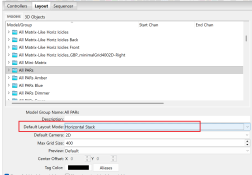
If you use the right kind of group it will behave mostly like a string (except when the effect wants something else).
1764708242211.png
 
Oh! Gotcha. I had been using Floods previously, but didn't connect on that shutter role. Makes sense now. What I did with General was seemingly a sort of manual equivalent but perhaps not as versatile in other ways... ?

Making that change next.

Can you elaborate at all on how to properly express the resulting PAR entries (be they flood or general) in a string format?

Thanks!
 
I should refine my previous question a bit: is there a way to know what an effect wants or will it just not produce output?

Thanks!
- Aaron
 
Further refinement: should I expect to be able to apply a Color Wash or Butterfly as examples? They appear to do nothing on a group level, so I'm inclined to think I do need to somehow express the PAR lights as a string if that is, indeed, possible.

Sorry for the rapid fire replies... just experimenting and asking sort of interactively. :)
 
Ah! Finally occurred to me how to do this. Again, sorry for the flurry of self-replies... maybe it will be helpful to someone in the future to see the progression. :)

What I missed was defining a string as made up of single node strings equal to the count of my PAR lights. This opened up the individual start channels I recall dealing with on my mega tree, to which I can assign each of the PAR lights. So I am finally seeing sequencing across the set in the manner I was hoping.

Thanks for bearing with me and getting me onto the right track absorbing more of the xlights model of operation!
 
Back
Top