


I'm looking for a tool to show me what I have missed and where in my sequences.
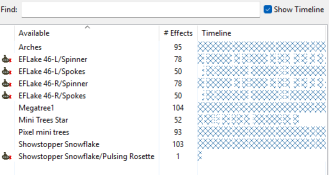
When you go to "import effects" in xlights and have the "show timeline" ticked there is a list of the props in use, the number of effects and a visible representation of where that occurs in the timeline for the imported sequence.
I'd like a tool that can process my sequences and generate something like an excel spreadsheet or something like with a preference of it being like the xlights "batch process" where it parses a directory and spits out an excel sheet per page with a report on what this numpty has missed in his sequences.
It's probably reasonably easy to do with a notepad++ macro, something in visualbasic or via excel but it's above my pay grade and someone may be better equipped to do it before I hit up 1 of the AI's to generate a tool for me.
When you go to "import effects" in xlights and have the "show timeline" ticked there is a list of the props in use, the number of effects and a visible representation of where that occurs in the timeline for the imported sequence.
I'd like a tool that can process my sequences and generate something like an excel spreadsheet or something like with a preference of it being like the xlights "batch process" where it parses a directory and spits out an excel sheet per page with a report on what this numpty has missed in his sequences.
It's probably reasonably easy to do with a notepad++ macro, something in visualbasic or via excel but it's above my pay grade and someone may be better equipped to do it before I hit up 1 of the AI's to generate a tool for me.
