Genereate Custom model

Juddge

Full time elf
Generous elf
Joined
Oct 15, 2023
Messages
342
Location
Glenmore Park - Penrith Area
ok so a friend and I have replaced an old motif with new seed pixels from the old rope light
we want to now generate a custom model

issue is we cannot get the motif to run the test sequence when ready to record

now im thinking we need to manually set a prop ?

do we just create a single line prop first in xlights , assign it the same amount of pixels as the custom prop, then visualise that prop to the port, and upload, then when running the generate custom prop to record the video it will work ?


this is the stop point for us, we tell it to run the sequence for the recording but it never runs the sequence on the prop ?


im sure we have missed a step somewhere

any help would be appreciated
or does the generate custom prop always use a certain port ?
 
  • Like
Reactions: AAH
In short - yes - or plug it into any port you already have defined which has at minimum the number of nodes on it that you need for your custom model.
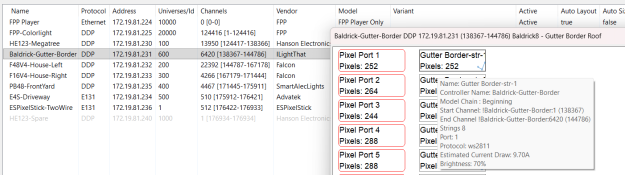
So - if I was doing a model that was 150 pixels long, I could plug into into the first port on this baldrick as it has 252 > 150 nodes defined:

1764895702974.png


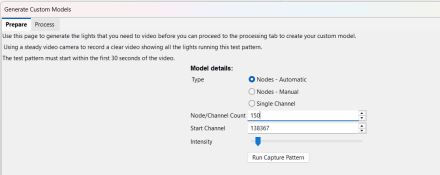
In the custom model generator - you would set the same start channel (138367 in this case) and the number of nodes:
1764895767208.png


You could also create a single line model of 150 nodes, and put it on a dedicated port (where the prop will end up) - the process is the same, it'll be assigned an xLights channel number, and after you do your controller upload etc, you can use that as the start address.
 
ahhh, ok now it makes sense, so either it has to be in port 1 with a clean non assigned controller, so it starts at channel 1 , or we need to identify what the start channel is and make sure at least the outputs for the port are matching pixel amount or higher

ok now it makes sense
 
ahhh, ok now it makes sense, so either it has to be in port 1 with a clean non assigned controller, so it starts at channel 1 , or we need to identify what the start channel is and make sure at least the outputs for the port are matching pixel amount or higher
Not exactly. That only makes sense if the controller is the FIRST/Only controller in your list on the controller tab.

Using my example above - you can see the channels assigned:
The F16v4 starts at channel 167179
The E4S on the driveway starts at channel 175912

If I put in channel 1, it would display on my P6 panel, which consumes the first 124 thousand channels

If it is a clean/unassigned controller - then it will have NO channels assigned. You need to have a prop on it, with the at least the number of channels required.
 
yeah thats what i thought i need to find what port and controller it is plugged into and what beginning channel thgat port / controller is

so unless im going to use a new install of xlights and a fresh built controller ill need to look and find it first

i checked and it appears the controller we were using was channel 2344 as the beginning of the port with the prop attached to it, so now we should be able to do the generate custom model
 
if we plugged it into the end of a string that ended on channel 3000 - the prop setting would be channel 3001 as the beginning of the custom generate model settings - but we need to ensure the port is set to have the correct or larger channel assignments so it can use that channel area -
 
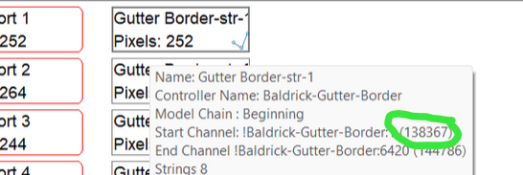
Easiest is to create the single line model as you suggested, add to to where you want to plug it in - likely a direct port. Do a an upload outputs, and get the channel number of that prop. You can find it by hovering over it in visualiser, as I did above.
1764911524396.png
 
Back
Top