1 prop not working correctly - need help

RonyRooman

New elf
Joined
Feb 15, 2021
Messages
11
My xlights setup is working great except for 1 prop - a window prop. I've checked the configuration up and down and can't find the culprit. I'm hoping this community can give me some ideas of what may be going wrong. I'm pretty sure it's a configuration I have wrong in xlights. I'm running FPP with an F48 with differential receivers. All other props in my display are working great.

During my show, the window prop doesn't look right. I'm not sure there's a specific pattern of the issue that I can describe. When I run a test in FPP to cycle through RGBW, red is incorrectly green and green is incorrectly blue. Blue and white works correctly. If I push the test button on my differential receiver to enable test mode, the colors are correct. This leads me to think it's a bad configuration in xlights.

I've double checked the color order for the prop. It's RGB like the others. I can't find anything funny or strange about that prop. I can plug in the window to another output from my controller and it works fine, so it's not an issues with the window lights.

This is connect on port 7. I'm using smart remote A, B, and C. The window prop is on A. There's nothing on B, but the prop on C works fine.

What might be causing this? What settings should I look closer at? I'm really scratching my head on this one.

Thank you in advance for your help!
 
Last edited:
Sounds like it is grb instead rgb. Did you use different pixel in the prop?
The pixel lights I'm using are all the exact same and should be rgb. I've used this prop for the last 4 years without issue. I tried updating the color order (to grb and others) and tested but it's still not right.

I should probably add that when I run my show, the prop has some odd results. It just doesn't look right. I mention the color from the RGBW test case it's easy to explain but it seems like it's something different.
 
Double check the receiver selector dial vs what you told xLights. Check for channel overlaps (use check sequence). Maybe save your layout, reupload the controller, and try one more time. (A lot of surprises disappear when you just nuke it. Other than that, we may need screen shots of the visualizer and the F48 web pages.
 
Double check the receiver selector dial vs what you told xLights. Check for channel overlaps (use check sequence). Maybe save your layout, reupload the controller, and try one more time. (A lot of surprises disappear when you just nuke it. Other than that, we may need screen shots of the visualizer and the F48 web pages.
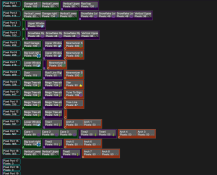
Here's a screenshot of my visualizer. I'll look to get one of the F48 web page. It's the "Lower Windows" on port 7A that is having the issue.
 

Attachments

  • Screenshot 2025-12-07 at 1.22.22 PM.png
    Screenshot 2025-12-07 at 1.22.22 PM.png
    180.1 KB · Views: 8
Double check the receiver selector dial vs what you told xLights. Check for channel overlaps (use check sequence). Maybe save your layout, reupload the controller, and try one more time. (A lot of surprises disappear when you just nuke it. Other than that, we may need screen shots of the visualizer and the F48 web pages.
When you say "Double check the receiver selector dial vs what you told xLights". Are you referring to the settings on the differential receivers that specify it as A, B, or C? I'm using an older version of the differential receivers (v1 I think) which has the switches for this. I'm pretty sure this is right cause the outputs on the other ports are working. Additionally, this is on the A smart remote and B and C are working correctly.
 
Double check the receiver selector dial vs what you told xLights. Check for channel overlaps (use check sequence). Maybe save your layout, reupload the controller, and try one more time. (A lot of surprises disappear when you just nuke it. Other than that, we may need screen shots of the visualizer and the F48 web pages.
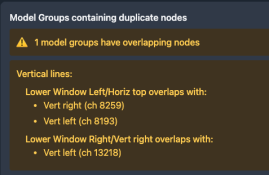
The check sequence shows no channel overlaps but does show model groups having overlapping nodes. I attached a screenshot of that but I don't think that's an issue. "Lower Window Left" is the prop having issues.
 

Attachments

  • Screenshot 2025-12-07 at 1.30.45 PM.png
    Screenshot 2025-12-07 at 1.30.45 PM.png
    36.4 KB · Views: 3
I am saying double check that the selector is on A, could be switches, sure. If it is not, only 5A, 6A, 7A, and 8A would be affected. No other ports or letters would get affected.. You are saying green is blue and blue is blue, not much other than the receiver could cause this.
 
I am saying double check that the selector is on A, could be switches, sure. If it is not, only 5A, 6A, 7A, and 8A would be affected. No other ports or letters would get affected.. You are saying green is blue and blue is blue, not much other than the receiver could cause this.
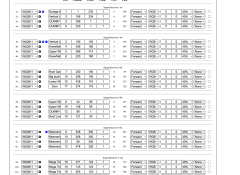
Here's my F48 config. It's the prop on 7A having the issue. 7B is empty. 7C works fine.
 

Attachments

  • Screenshot 2025-12-07 at 1.54.52 PM.png
    Screenshot 2025-12-07 at 1.54.52 PM.png
    500.1 KB · Views: 7
Switches on my differential receiver look right. I reset my F48 and re-uploaded my config and the same issue persists.
 
OK, the cable could be bad. A little bit bad. If only one of the 4 pairs is bad / poor connection, you'll only get flickering on one port of the smart receiver. If it's the last receiver in the chain, the others won't be affected either. So that would cause problems on just one port of one SR.
 
Back
Top