
aimbrunone
Apprentice elf
- Joined
- Jan 19, 2024
- Messages
- 67
Having some issues configuring the 4 channel flood from your pixel store. https://yourpixelstore.com/product/pre-sale-add-on-floodlights-ws2811-rgbuv/
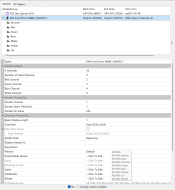
Not sure if their instructions are the best way to set up in xlights. I was told to set up as two separate props. One as the uv and one as the rgb. Thought it was working correctly but on second look, it’s not.
Has anyone used these and can give any advice?
Thanks
Not sure if their instructions are the best way to set up in xlights. I was told to set up as two separate props. One as the uv and one as the rgb. Thought it was working correctly but on second look, it’s not.
Has anyone used these and can give any advice?
Thanks