Different Angled houses Xlights setup

Gooliez

New elf
Joined
Dec 31, 2025
Messages
20
Location
Spreyton, Tasmania
Hi Guys,

So my house is a bit of a pain with angles on the sides I can work with. how do you set it up in Xlights?

do you just take multiple photos at flat angles and join them all together? it's the only way i can think it'll work.
my house ( pic in my profile) has 6 different angles on the one part technically. so when it comes to scaling the lights, it's a little out of whack.
 
You can create a 3D model yourself or there are companies that can do it for you.


View: https://www.reddit.com/r/xlights/comments/1i2xcne/3d_model_of_home_for_xlights/


gives a good example of how to use hover. Just need to mention that you are a home owner and doing it for Christmas lighting and its free!

Alternatively, you can just use a single image and stretch props to how it looks from that angle. Xlights renders (mostly) from a flat 2D perspective, so no matter if you have a detailed 3d model or flat 2d version, it should look about the same.
 
You can also just set up 2D pictures of your house in 3D mode - rotate them to fit the plane of where they are taken from.
It'll look a bit dicky though, so you keep the images dim.

You also don't need an image at all.
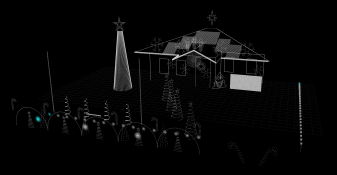
My 3D layout has nothing other than the lights on it - and I can clearly understand everything that's going on in it- because of the shape of the house, location of the props etc. The only downfall of not having an actual model is that it's "See through" - I can see lights in the xLights render that are otherwise blocked by parts of the house from a particular angle

1769077499730.png


Xlights renders (mostly) from a flat 2D perspective, so no matter if you have a detailed 3d model or flat 2d version, it should look about the same.
There's a big difference between 3D mode and 2D mode as far as what you can do when rendering is concerned. Yes, everything is rendered on a 2D plane, and if you always leave the default rendering settings intact, it'll be (mostly) the same.
However, the real power of setting up in 3D mode you have the ability to choose the Perspective/Camera Angle to which the render of the effect is made. That way you can have stuff going front-to-back, with say a top-down camera view. There's no way to do that if you use a flat photo of your house and set up in 2D mode, everything is "Faked" from that single 2D perspective.
 
You can also just set up 2D pictures of your house in 3D mode - rotate them to fit the plane of where they are taken from.
It'll look a bit dicky though, so you keep the images dim.

You also don't need an image at all.
My 3D layout has nothing other than the lights on it - and I can clearly understand everything that's going on in it- because of the shape of the house, location of the props etc. The only downfall of not having an actual model is that it's "See through" - I can see lights in the xLights render that are otherwise blocked by parts of the house from a particular angle

View attachment 30699


There's a big difference between 3D mode and 2D mode as far as what you can do when rendering is concerned. Yes, everything is rendered on a 2D plane, and if you always leave the default rendering settings intact, it'll be (mostly) the same.
However, the real power of setting up in 3D mode you have the ability to choose the Perspective/Camera Angle to which the render of the effect is made. That way you can have stuff going front-to-back, with say a top-down camera view. There's no way to do that if you use a flat photo of your house and set up in 2D mode, everything is "Faked" from that single 2D perspect
Thanks for the reply, I honestly didnt even realise there was a 3d mode. i'll have to look into the program more, so much to learn !
 
Back
Top