


- Joined
- Jan 8, 2026
- Messages
- 87
So I got tired of pushing pixels today and got back into the software side of this hobby.
I have my Falcon F16 setup in xLights and have it configured as a proxy in my FPP Pi4 instance so that xLights can see it, open the controller interface, and upload outputs to the F16.
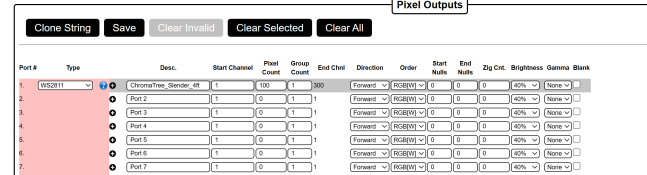
I made a simple layout with just a 4ft ChromaTree (100 nodes) and uploaded to the controller. Switch over to the controller's screen and I can see that xLights did update Port 1 with my tree. Figured at this point I'd be able to go to the Tools menu and select "Test" to run a test sequence and see my tree operate... but nothing. xLights says it's testing 300 channels but I don't get any lights on my ChromaTree.
So I head back to the Falcon's Test page and click the "enable" box... the ChromaTree comes to life and does it's thing with the configuration that was sent up from xLights.
What am I missing here? How to I get test sequences to run direct from xLights without going into the Falcon's page?
Not sure what information or screenshots are pertinent to aid anyone in answering that question, so let me know if more info is needed and I'll gladly post it. In the meantime, I'm going to splice in some wiring to my 6ft ChromaTrees. Apparently the spacing between 4 of the nodes is 5" instead of 4", so that doesn't work without a little extra help
Thanks.
I have my Falcon F16 setup in xLights and have it configured as a proxy in my FPP Pi4 instance so that xLights can see it, open the controller interface, and upload outputs to the F16.
I made a simple layout with just a 4ft ChromaTree (100 nodes) and uploaded to the controller. Switch over to the controller's screen and I can see that xLights did update Port 1 with my tree. Figured at this point I'd be able to go to the Tools menu and select "Test" to run a test sequence and see my tree operate... but nothing. xLights says it's testing 300 channels but I don't get any lights on my ChromaTree.
So I head back to the Falcon's Test page and click the "enable" box... the ChromaTree comes to life and does it's thing with the configuration that was sent up from xLights.
What am I missing here? How to I get test sequences to run direct from xLights without going into the Falcon's page?
Not sure what information or screenshots are pertinent to aid anyone in answering that question, so let me know if more info is needed and I'll gladly post it. In the meantime, I'm going to splice in some wiring to my 6ft ChromaTrees. Apparently the spacing between 4 of the nodes is 5" instead of 4", so that doesn't work without a little extra help
Thanks.

