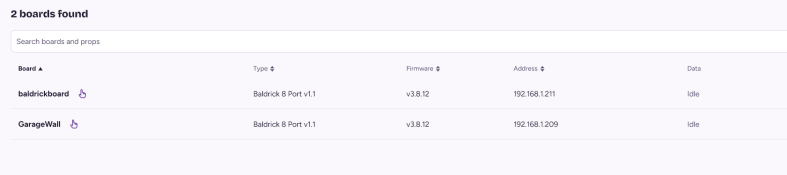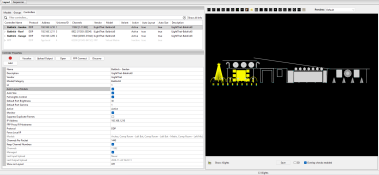
Xlights or Baldrick...OR me? Light output is different to xLights

Gooliez

Apprentice elf
Joined
Dec 31, 2025
Messages
68
Location
Spreyton, Tasmania
So got most of my lights setup yesterday, thought i'd test out what it currently looks like. few problems that someone may be able to help with

ok, first.

1. My output is different to whats been displayed on Xlights.
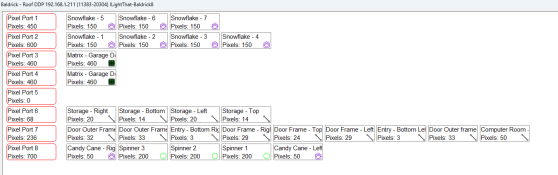
Xlights, the Matrix (20 x 46 = 920 nodes)is split into 2 ports, 460 each.
Baldick is saying Number of pixels is 460 ( which is correct) for both ports.
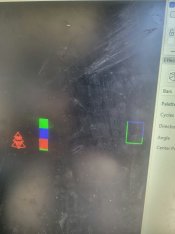
For some reason when I do a test using Bars there's extra pixels that arent lining up with the actual display, but look good on Xlights.
I've re-uploaded the settings, Rebooted the board. doesnt fix it.
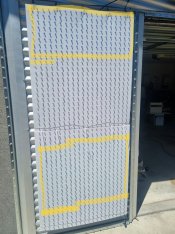
oXy5m40O.jpg

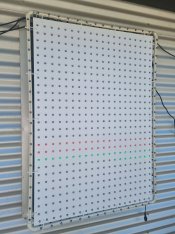
2. Top 4 rows are ignored.
Wiring is correct, Xlights wiring diagram matches.
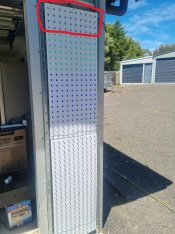
BoSPic1j.jpg

3. Test pattern produces extra lighting on other props.
Testing with Bars again, specifically to the 1 prop, others are lighting up. Both in Xlights and random sections of additional props (not matching whats happening on Xlights)
LhEy8sIG.jpgb-rAFFNc.jpg-HGOfXpe.jpg


Thanks!
 
Can you give some screenshots on how the prop/controller is setup in xLights and the visualiser for the controller? Are you using FPP to test or using output to lights through xLights?

You may have overlapping channels, in the house preview you can check 'Overlap checks enabled' and see if anything stands out.

I'd also make sure in the controller tab that you have Auto layout models, auto size and full xlights control enabled.

My other thought would be to make sure you have rendered and saved as you may have made changes that the sequence isn't aware of. If using FPP reupload the sequence after you render too.

Or, download the baldrick buddy app and it may let you know what's wrong and how to fix it.
 
It looks like controller misconfiguration to me.

ChristmasDave is correct. Be sure to render all sequences, reupload the config and the sequences to the player and your controllers.

Also try running Tools/Check sequence.
 
Ok,

so
Auto Layouts already checked!
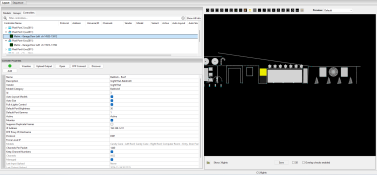
I've enabled Overlaps. i'm seeing nothing change? is it meant to highlight if there's issues?


I'm testing this with a new sequence. JUST the bars. and i hit the "output to lights" and play.
havent got as far as a made up sequence yet.

also downloaded buddy. but it's not showing me anything error wise
 

Attachments

  • Screenshot 2026-11-25 163543.png
    Screenshot 2026-11-25 163543.png
    156 KB · Views: 6
  • Screenshot 2026-11-25 163638.png
    Screenshot 2026-11-25 163638.png
    35.9 KB · Views: 6
  • Screenshot 2026-11-25 164036.png
    Screenshot 2026-11-25 164036.png
    26.6 KB · Views: 7
  • Screenshot 2026-11-25 164551.png
    Screenshot 2026-11-25 164551.png
    146.3 KB · Views: 6
Nothing jumps out at me from those screenshots, everything does look OK. With overlaps, once enabled you can just click each model under the model tab and if models are overlapping then they will highlight in red in the preview.

This is a stupid question and only ask as it's something I've done in the past, everything is definitely physically plugged into the matching port as shown in your visualiser?

I'd follow MikeKreb0 advice next, rerender and save and if still not working run; tools > check sequence and see if you have any errors or applicable warnings
 
I really wish there was something plugged in wrong. at least i'd have an answer.
The only thing that i can thing of is that xlights crashed as i was uploading the output data halfway through. however, i've since then done multiple uploads and even updated the baldrick firmware to the latest version
 
Back
Top