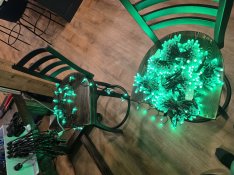
First controller setup and ready to roll!

I did not use any fuse blocks in my controller boxes as I run everything from my controllers. For the two boxes with multiple power supplies they are tied together and then are split to power each side separately. So, PS 1 powers 1 - 8, and PS 2 powers 9 - 16. I did buy some fuse blocks and have them on hang but have yet to use them. I did use an older Hanson Power8 in one of my smart receiver boxes but never used PI to warrant it.

Edit:
I can run about 250 pixels without worry of color issues and flickering. After that I use a cable to split power from the front to the last xConnect plug which resolves the issue. I use the spikerT and Spiker H cords.
 
I will be thrilled if I can get 400 pixels before needing to worry!
400 is based on 100% full white, but connecting power at both ends of the string... using T on the same controller port. The 12V seeds, lumidot, gem/evo, and WS2808 respond well to this, but the GS8208 does not, resistor does OK with it but the power consumption is more.
 
Hmm, well 400 seem to run just fine on a single channel. I guess I need to read up on universes vs channels and what not. I guess the basic premise is 512 channels per universe so my 1st channel has multiple universes to get this many pixels running?

Wonder how far this can go before I lose color or brightness...6051.jpg
 
Channels and universes are no longer used with modern controllers and software, it's a nice to know but not anything we need to worry about at this time. Single colors tend to draw less power then running white which uses all of the colors. Turn it to white to get the best idea of how they will react.
 
Channels and universes are no longer used with modern controllers and software, it's a nice to know but not anything we need to worry about at this time. Single colors tend to draw less power then running white which uses all of the colors. Turn it to white to get the best idea of how they will react.
Haha yes I did that at 70% and I got 350 before they started "not being white".

Channels and universes I just had to setup so I had open communication channels to test with. Otherwise the data wasn't flowing. I get it one I go to actually to a show in xLights it'll populate all that for me (I think), but as a first time user I needed to open things up for testing :)
 
I did not use any fuse blocks in my controller boxes as I run everything from my controllers. For the two boxes with multiple power supplies they are tied together and then are split to power each side separately. So, PS 1 powers 1 - 8, and PS 2 powers 9 - 16. I did buy some fuse blocks and have them on hang but have yet to use them. I did use an older Hanson Power8 in one of my smart receiver boxes but never used PI to warrant it.
I hadn't even thought of that. I can run 2 PSUs, one on V1 and one on V2... same as running a standalone 2nd PSU but no worries of what's feeding what.

Love it when a plan comes together.
 
Channels and universes I just had to setup so I had open communication channels to test with. Otherwise the data wasn't flowing. I get it one I go to actually to a show in xLights it'll populate all that for me (I think), but as a first time user I needed to open things up for testing :)
Switch to DDP. Don't use E1.31.
DDP is just channel numbers and things are a lot more straightforward (as well as slightly more efficient but that's irrelevant)
Channel 265 in xLights is channel 265 in the FSEQ, which is channel 265 in FPP, and channel 265 on the controller.
 
Switch to DDP. Don't use E1.31.
DDP is just channel numbers and things are a lot more straightforward (as well as slightly more efficient but that's irrelevant)
Channel 265 in xLights is channel 265 in the FSEQ, which is channel 265 in FPP, and channel 265 on the controller.
Based on the way you explained DDP, can I assume you use "DDP - One Base"? Brief research shows DDP is much more efficient for sending network data. That shouldn't be a bottleneck anyway, but who knows what lights I'll have in 5 years and whether it'll make a difference. I have to get used to a protocol either way so might as well go with the more modern one.

I have tested all 3,000 lights now and all pixels are good. I didn't expect this type of pixel to feel so bulky, but the ones I got from VSL have thick wire coatings and are sealed very well around the base of the light. I don't know who they source from, but they feel like a quality pixel.
 
I think the point was that universes and channels are a historical implementation artifact and not something that you need to spend brain cells on. If your controller needs them, xLights will configure it for you. If you use DDP, they go away entirely. Switching between E1.31 and DDP is also easy, you hit the dropdown, then upload to controller, maybe rerender sequences in some cases (but not a concern for you ... yet).

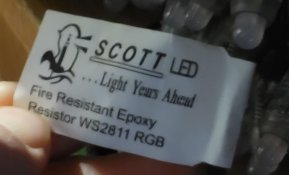
There are 3 main companies (use that term loosely) that produce pixels like this. (See:
View: https://youtu.be/AIAhI841nFE
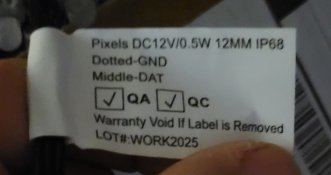
for some lazy Saturday viewing pleasure.) Based on the tag style, those appear to be ScottLED (see images of a known ScottLED tag below). ScottLED does have a good reputation for quality in recent years. There are other styles of pixels (and many trade names for a few designs ... evo, gem, gumdrop, dome, flatback, lumidot, rectangle module, C9, globe, seed, strip, etc.) but they have different applications... these bullet node pixels are currently the best for 10mm coro cutouts. Can be used for trees, HDPEs, matrix, etc., but are a bit bulky compared to other options.
 

Attachments

  • 20260131_130215.jpg
    20260131_130215.jpg
    148.7 KB · Views: 0
  • 20260131_130648.jpg
    20260131_130648.jpg
    186.7 KB · Views: 0
Right, I get it that xLights is going to do all the hard work for me. I'm an engineer with OCD though and still like to know how everything works, so I read up on the things that are going to affect me. Setting up a couple universes to test pixels is no big deal. If you had to sit there and do it for 50,000 pixels you may go nuts... kind of like when I was a kid of we had to program HTML in a text editor (shoot we did that for SQL as well), now you can essentially drag and drop designs since there's a GUI front end on just about every program.

DDP appears to want to configure things a little differently. It just wants to know the start channel and how many channels are on that port.

Question - Does DDP still treat a single bullet node as 3 channels (R,G,B) or have they simplified that? Put another way, if I want to run a max of 500 bullets on a port in DDP, do I need to tell it 1500 channels or just 500 (and please say 1500 because I just setup my 16 ports that way).

Good to hear VSL is selling decent pixels, the tags do look very similar to what you posted. VSL has a really good reputation here in the states. Not sure if the folks down under know about them. Everything I've read about them is that they provide great service and have quality products + reasonably priced sequences. I talked to the co-owner for some time after placing my first order as he runs their 3D print farm & production and I (and my son) also have a business running a print farm.

Anyway, learned a lot over the last couple of days. I'm going to transfer my attention from FPP and the Controller interface to xLights so I can start learning that program. I don't know that I need to learn how to make spectacular shows as I may take the easy route and buy a few of those set to my favorite music. I do want to learn how to make models so as I 3D print my own props I can set them up correctly in xLights. Lots of tutorials on YouTube so off I go :)
 
Yes, an RGB pixel is always 3 channels (R+G+B). There are pixels with different number of channels (R+G+B+W is 4, a string of dumb lights might be just 1, a fancy PAR can might be 10).

The engineer perspective, bottom up:
WS2811 Pixels do not care about much, they work in isolation from each other. They grab 3 channels (24 bits) worth of data of the data line and pass the rest down the line (some chips are so simple that they just squelch the data output line until 24 bits have passed, then open up data flow after that; other chips regenerate it more thoroughly). (WS2811 is the name of a specific chip, yes, but in most cases the term is simply used to refer to the data signal timing used by that chip and implemented by countless other chips.)
The controller needs to map input data from the network onto its numerous ports. The configuration of how many pixels are on each port takes care of that. (This is controller-specific, the controller's mental model of how to do it and exact configuration parameters / protocol varies greatly between brands.)
The controller needs to stitch together pixel data from multiple UDP data packets sent by the player to make a frame:
E1.31 - has a huge header with all kinds of (mostly ignored) options that implements DMX over IP, and is therefore 1 512-channel universe per packet. The controller uses the universe number to orient it relative to the rest of the packets and place it into the proper part of frame memory. Overall network efficiency ~75%, more CPU load to handle the packets and headers.
DDP - is like "what's the minimum requirement here" and has a very simple header + as many data bytes as you can fit to fill an Ethernet frame. The controller uses the channel number and maybe the sequence number to place the data into its frame memory. Overall network efficiency ~95%, less CPU load to handle the packets and headers.

Of course, as long as xLights and the controller are in agreement, and you are well below peak utilization, this really doesn't matter at all... it "just works".

FWIW I like VLS. (And almost all other vendors. Only RGBMan and PixPlus have earned my spite based on incidents that happened to me personally.)
View: https://vimeo.com/1149194076/57c8315b7e
is a VLS sequence. Not sure why they got into the pixel distribution business (sounds terrible) but that's above my pay grade.
 
If you had to sit there and do it for 50,000 pixels you may go nuts...
It's really not that difficult. I'm one of the few that hasn't gone the DDP route with about 50k pixels. If I was starting over, I might give it a try. I prefer to assign uni:cha for every model. Easy to find issues if there is one. Make sure the controller and xlights configuration match. I like to see how things work as opposed to letting xLights do it all for me
 
Based on the way you explained DDP, can I assume you use "DDP - One Base"?
No, I use the DDP-with Keep Channel Numbers ticked. (DDP-Raw Numbers in FPP i believe)
For a single controller, they are identical. When you get multiple controllers is where it changes.

Lets say I have 3 controllers running DDP, each with 300 pixels (900 channels) on them. For simplicty in my explanation, I'm assuming these are all on a single prop on a single port. It's irrelevant though.
In xLights, they would be represented like this
-> Controller 1- Channels 1 to 900
-> Controller 2- Channels 901-1800
-> Controller 3- Channels 1801-2700

In the FSEQ file, there are 2700 channels rendered, as channels 1-2700
FPP (or xSchedule) would have 3 controller definitions
-> Controller 1- Channels 1 to 900 -> send to IP address 10.1.1.1
-> Controller 2- Channels 901-1800 -> send to IP address 10.1.1.2
-> Controller 3- Channels 1801-2700 -> send to IP address 10.1.1.3

For "Keep Channel Numbers / Raw Channels"
-> Controller 1 would receive a DDP frame with channels 1-900
It would be configured (by xLights push) to map channels 1-3 to pixel 1, 4-6 to pixel two, and 898-900 to pixel 300 on the first output
-> Controller 2 would receive a DDP frame with channels 901-1800
It would be configured (by xLights push) to map channels 901-903 to pixel 1, 904-906 to pixel two, and 1798-1800 to pixel 300 on the first output
-> Controller 3 would receive a DDP frame with channels 1801-2700
It would be configured (by xLights push) to map channels 1801-1803 to pixel 1, 1804-1806 to pixel two, and 2698-2700 to pixel 300 on the first output

As you can see - each controller still sees the original channel numbers from xLights. Channel 2204 is always the Green channel on pixel 134 of controller 3, no matter where you look.

Now - for "1-Based" - up to FPP, the configuration is the same - BUT - when FPP sends out the data to the controller, it's different
-> Controller 1 would receive a DDP frame with channels 1-900
It would be configured (by xLights push) to map channels 1-3 to pixel 1, 4-6 to pixel two, and 898-900 to pixel 300 on the first output
-> Controller 2 would receive a DDP frame with channels 1-900, which was originally sourced from 901-1800, and renumbered
It would be configured (by xLights push) to map channels 1-3 to pixel 1, 4-6 to pixel two, and 898-900 to pixel 300 on the first output
-> Controller 3 would receive a DDP frame with channels 1-900, which was originally sourced from 1801-2700, and renumbered
It would be configured (by xLights push) to map channels 1-3 to pixel 1, 4-6 to pixel two, and 898-900 to pixel 300 on the first output

Each controller "Sees" channels 1-900 - however, they come from different source channels.
Your controller configuration would always reference channels 1-it's max, rather than the range it's been allocated in the configuration elsewhere.

There is only 1 (very minor) advantage to this which I'll explain below.
Lets say I add 5 pixels (15 chnanels) onto controller 1.
Controller 2 now becomes channels 916-1815, and Controller 3 becomes channels 1816-2715.
In this case, you would need to reconfigure both controller 2 and 3 to support the new channel numbers. With 1 based, they will remain as 1-900.
HOWEVER - this is mitigated by the fact that when you're pushing from xLights (As you should be these days) - it's only a couple of buttons to upload your config to ALL controllers.
You still need to re-render all your sequences, and push new FPP configuration, so adding the controller push isn't difficult.
If you do everything by hand, I can see benefits in keeping it 1 based. Note that FPP based controllers don't support 1-based anyway, they have to be raw channel numbers.

Now - that all being said, there is only 1 place I use the "1-based" - and that is for WLED based controllers. And the reason for that is that they don't support raw channel numbers - they expect channels to start at 1. However - another caveat - I believe this has recently changed with an updated WLED release.
 
Makes sense, certainly more logical than universes, galaxies, channels... I think maybe there was a nebula out there too 😉(sarcasm off).
I did switch my settings over to DDP. Manually configured 16 ports to each have 1500 channels. Thats really just so I can tinker before I make anything in xLights and I see how the configuration will go.
My first props from Boscoyo should be here Thursday and I have several 100 node props being printed on our farm. Once they get here I'll let xLights take over the config with the layouts I push.
 
Back
Top