
Slam
New elf
- Joined
- Oct 3, 2018
- Messages
- 31
Hi gurus,
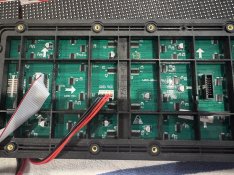
I’ve started a new P5 build and flipped from using octo to colorlight. I’ve managed to be able to get the led software to talk to the card but cannot seem to get any panel output. I’ve tried using intelligent setting and manual settings based on googling suggested setting for Ray Wu supplied P5 outdoor panels.
Anyone have any expertise on this to help guide me? I really prefer to stick with colorlight but might have to revert to octo even if just to test the new P5s are ok (power etc).
I’ve started a new P5 build and flipped from using octo to colorlight. I’ve managed to be able to get the led software to talk to the card but cannot seem to get any panel output. I’ve tried using intelligent setting and manual settings based on googling suggested setting for Ray Wu supplied P5 outdoor panels.
Anyone have any expertise on this to help guide me? I really prefer to stick with colorlight but might have to revert to octo even if just to test the new P5s are ok (power etc).