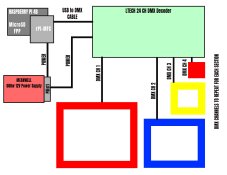
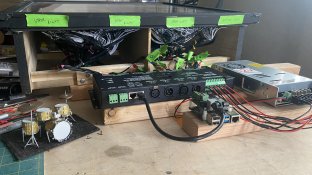
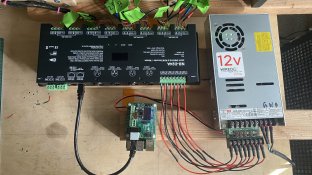
This is a non-holiday related project and much smaller scale than some of these incredible displays I’ve seen using xLights. I believe xLights can perform the task I’m attempting and hopefully, in a short amount of time. I’ve done research, but I’m not confident. I tried to post on xLights' Forum. It was unresponsive to join. It's built, but making it perform on its own falls into uncharted territory. I looked online and found programming Christmas lighting setups seems to run parallel with my project.
I built a dance floor prop for a stop motion music video. During the design, I didn’t need programming since I could flip the switches for the lighting sequence for each frame as I shot. After the shoot, I’ve been asked to display it at an event and now, I’ll need to make it have standalone programming.
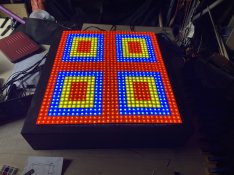
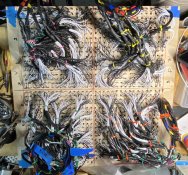
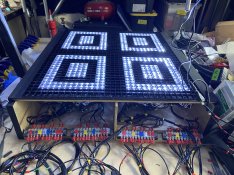
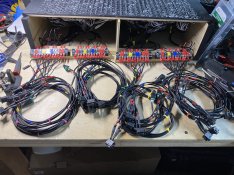
Built with individual one color 12V LEDs (1,152 with pre-wired resistors) wired together as sections under acrylic (inside red, yellow, blue, outside red) and quadrants (upper left, upper right, bottom left, bottom right) using physical on-off switches (16 total - powered with AC wall warts.)
I’m looking to have the lighted sections turn on and off in a programmed sequence.
In xLights, I built each colored section based on the physical switches and wiring. I used multiple Single Lines and then Grouped them. I’ve built the correct timings in the Sequencer.
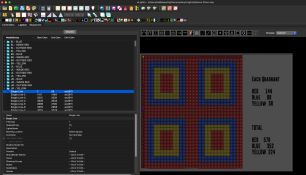
The display will be on a table so there won’t be extended runs of wiring, etc.
I’m looking for recommendations on how to facilitate the sequencer and DMX. I have a power supply that does 12V conversion that I use for a different prop and will power the setup.
I looked at the ENTTEC Open DMX USB connected to a 24 Channel LED DMX512 Decoder to use with a computer/laptop setup. Is it possible to utilize a single board computer or will I need to have a laptop or other system for the sequencer? Any recommendations? Truly appreciate any help.
If I'm missing any needed information to facilitate assistance, please let me know.
I built a dance floor prop for a stop motion music video. During the design, I didn’t need programming since I could flip the switches for the lighting sequence for each frame as I shot. After the shoot, I’ve been asked to display it at an event and now, I’ll need to make it have standalone programming.
Built with individual one color 12V LEDs (1,152 with pre-wired resistors) wired together as sections under acrylic (inside red, yellow, blue, outside red) and quadrants (upper left, upper right, bottom left, bottom right) using physical on-off switches (16 total - powered with AC wall warts.)
I’m looking to have the lighted sections turn on and off in a programmed sequence.
In xLights, I built each colored section based on the physical switches and wiring. I used multiple Single Lines and then Grouped them. I’ve built the correct timings in the Sequencer.
The display will be on a table so there won’t be extended runs of wiring, etc.
I’m looking for recommendations on how to facilitate the sequencer and DMX. I have a power supply that does 12V conversion that I use for a different prop and will power the setup.
I looked at the ENTTEC Open DMX USB connected to a 24 Channel LED DMX512 Decoder to use with a computer/laptop setup. Is it possible to utilize a single board computer or will I need to have a laptop or other system for the sequencer? Any recommendations? Truly appreciate any help.
If I'm missing any needed information to facilitate assistance, please let me know.