Joining 2 items together - Program wise

Gooliez

New elf
Joined
Dec 31, 2025
Messages
15
Location
Spreyton, Tasmania
So new to all this, so talk like your explaining to a 5 year old. lol

I would like to make some custom size Mini-trees with a star on top.
i've figured out how how to make the Tree, it's only going to be 180 degree view, 36 nodes per string and 5 Strings.
The star on top will be 30 nodes.

Now how do I tell Xlights that these two seperate things are using the same physical wire? EG Nodes 1-36 is tree part and then Nodes 37-67 are the star part?

is it something I have to edit in the wiring diagram or make a whole new Custom or am i over thinking this way too much?
if there's a video explaining this, even better. i've tried youtube, but i cant find the right video on how this is done

Thanks!
 
Last edited:
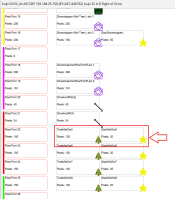
It's really easy. Just use the visualizer and drop the tree and the star on the same controller port, tree first. (There's lots of videos, but ... just easier to show in a screen shot.)
1767495300700.png
But let's go back to the tree for a second... there are strings, strands, and pixel nodes. How many pixels/nodes does the tree have, 36 * 5 = 180? In this case you want 1 string of 180, 5 strands per string (so that it divides it up as 5x36). If you say 5 strings, it will take 5 controller ports (which is way many for a mini tree like that).
 
You need to have a controller added in xlights to do this.

Go to Controller tab select a controller and select visualise.
From there you can can drag and drop them in the order they are connected to the controller


Screenshot 2026-01-04 at 1.57.54 pm.png


Screenshot 2026-01-04 at 2.01.35 pm.png
 

Attachments

  • Screenshot 2026-01-04 at 1.57.54 pm.png
    Screenshot 2026-01-04 at 1.57.54 pm.png
    398.2 KB · Views: 0
It's really easy. Just use the visualizer and drop the tree and the star on the same controller port, tree first. (There's lots of videos, but ... just easier to show in a screen shot.)
View attachment 30595
But let's go back to the tree for a second... there are strings, strands, and pixel nodes. How many pixels/nodes does the tree have, 36 * 5 = 180? In this case you want 1 string of 180, 5 strands per string (so that it divides it up as 5x36). If you say 5 strings, it will take 5 controller ports (which is way many for a mini tree like that).

Thanks for that, that's making sense. I dont actually have the controllers etc in my possession yet, so starting to draw it all up on Xlights whist waiting.

my terminology is pretty bad, but I will have a total of 36 Pixels to cover the base of the tree and about another 30 for the star, for a total of 66 total pixels.
I ordered strings of 100 pixels, so will cut them back.

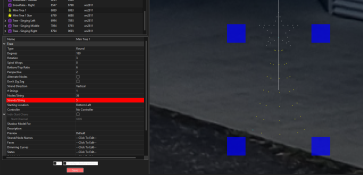
Pic attached.
 

Attachments

  • Screenshot 2026-01-04 141228.png
    Screenshot 2026-01-04 141228.png
    131.7 KB · Views: 5
You need to have a controller added in xlights to do this.

Go to Controller tab select a controller and select visualise.
From there you can can drag and drop them in the order they are connected to the controller


View attachment 30599


View attachment 30601
So right that's my issue, I havent got the physical hardware yet, thought i'd do some setting up in Xlights and get some practice in programming. what you've shown make sense though. thanks !
 
You can add a controller you don't own yet. But it doesn't matter until much later if things are connected to controllers or not.

Also, the 5 strands is red because 36 doesn't divide by 5. Try 35?
 
You can add a controller you don't own yet. But it doesn't matter until much later if things are connected to controllers or not.

Also, the 5 strands is red because 36 doesn't divide by 5. Try 35?
Oh right, i thought it was a "Detected" thing when you connect it then it shows. AH, that's why it's red! I'll get there eventually. ha ha
 
So correct me if i'm wrong, but on 1 port, i could have -

Tree - Star -> Tree - Star -> Tree - Star -> Tree - Star -> Tree - Star -> Tree - Star
for 5 "Minitrees with stars on top" in a row, As long as i have the spare cable link them together.

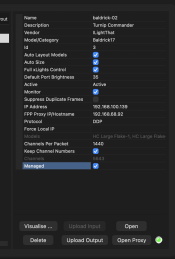
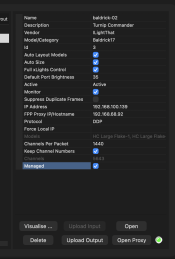
I'm looking at the Baldrick 8 Port controller. From what I can see, the controller supports up to 750 Pixels per port. so I should be well under the limit for 5 minitrees without the need of a "power booster"
 
So correct me if i'm wrong, but on 1 port, i could have -

Tree - Star -> Tree - Star -> Tree - Star -> Tree - Star -> Tree - Star -> Tree - Star
for 5 "Minitrees with stars on top" in a row, As long as i have the spare cable link them together.

I'm looking at the Baldrick 8 Port controller. From what I can see, the controller supports up to 750 Pixels per port. so I should be well under the limit for 5 minitrees without the need of a "power booster"
this is what I have on one of my baldrick ports and works fine. you still might need more power though as the port limits are dependent on having enough power to run them. if you don't add more power you'll have to run at low % and still might get discolouration or other issues
 
So correct me if i'm wrong, but on 1 port, i could have -

Tree - Star -> Tree - Star -> Tree - Star -> Tree - Star -> Tree - Star -> Tree - Star
for 5 "Minitrees with stars on top" in a row, As long as i have the spare cable link them together.

I'm looking at the Baldrick 8 Port controller. From what I can see, the controller supports up to 750 Pixels per port. so I should be well under the l for 5 minitrees without the need of a "power booster"

Yes you can run 750 pixels per port on a Baldrick. But you will need to make sure you have enough power to power balance or inject.


View: https://youtu.be/fTuErhiO_ng?si=3ei0IrRyC-EKCG8A


Greg has some really good videos and uses Baldricks in the demos. It helped me so much over the past few months. Just watch them all from 2025
 
IIWM and I had 100 node strings, I would make 100 node trees. Maybe 7x10 or 5x14 and then your 30 node star. This eliminates the cut and patch and still get 6 or 7 trees on one port. Yes it takes 35 more pixels per tree. It will look fuller and will be so much easier to put together.
 
So correct me if i'm wrong, but on 1 port, i could have -

Tree - Star -> Tree - Star -> Tree - Star -> Tree - Star -> Tree - Star -> Tree - Star
for 5 "Minitrees with stars on top" in a row, As long as i have the spare cable link them together.

I'm looking at the Baldrick 8 Port controller. From what I can see, the controller supports up to 750 Pixels per port. so I should be well under the limit for 5 minitrees without the need of a "power booster"

:D

1767586606011.png

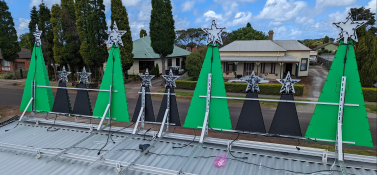
This is for my bigger minitrees. They are only half set up in this pic but you can see that they go in the bottom then out through the star then on to the next one.

1767586944736.png

Small ones are on their own run because of Reasons.
 
:D

View attachment 30611

This is for my bigger minitrees. They are only half set up in this pic but you can see that they go in the bottom then out through the star then on to the next one.

View attachment 30612

Small ones are on their own run because of Reasons.
Thanks for the pictures, sometimes explaining just doesnt cut it. I'm intrigued by the framework you are using, is that solar panel framework?
 
Back
Top