P5 Build...

slw2206

Apprentice elf
Generous elf
Joined
Jan 8, 2026
Messages
80
@merryoncherry ...so you were right, I am taking on more projects. Gotta have something to keep busy :)

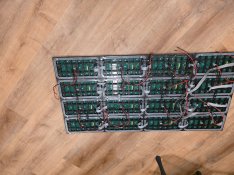
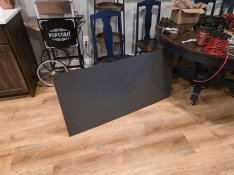
I bought 16 outdoor P5 panels and have them all screwed and wired, waiting for an "enclosure". I saw a number of designs on the forums of various builds so once the weather warms up a bit (21F here this morning) I'll get to building a suitable outdoor enclosure.

As far as electronics and power for these panels, I have a couple questions that I could use input on:

  1. Can someone post a reasonable amp draw for these panels? I'll probably run them at 30-40% brightness if they're anything like the bullet pixels. I bought 3 350W PSUs (and have a spare 600 too) so I think I'm covered, but I don't want to go overkill either if I can use a PSU elsewhere in my setup.
  2. Can I use the Pi4 I already have in my main controller box to control these panels? I also run FPP from that Pi4 so not sure if it'll be too much or if there's ample CPU power. Older threads (referencing older Pi's) said you need to get a standalone for panel display, but most of the threads I read were 2-3 years old.
  3. What else do I need to know before I get too deep into this? On the software side are there items with the setup and programming of these panels that I need to know?

As always, thanks guys. Pulling this stuff together is going very well and I think I'll be ready for Xmas with a decent display!
 

Attachments

  • 20260407_105229.jpg
    20260407_105229.jpg
    958.2 KB · Views: 10
  • 20260407_105108.jpg
    20260407_105108.jpg
    1.2 MB · Views: 11
@merryoncherry ...so you were right, I am taking on more projects. Gotta have something to keep busy :)

I bought 16 outdoor P5 panels and have them all screwed and wired, waiting for an "enclosure". I saw a number of designs on the forums of various builds so once the weather warms up a bit (21F here this morning) I'll get to building a suitable outdoor enclosure.

I used some 2x2 clear pine as an internal support and then wrapped it with 1x4 pvc trim from Home Depot. I'll grab the sign from storage and then can post some pics of it. It's ugly and worked.

As far as electronics and power for these panels, I have a couple questions that I could use input on:

  1. Can someone post a reasonable amp draw for these panels? I'll probably run them at 30-40% brightness if they're anything like the bullet pixels. I bought 3 350W PSUs (and have a spare 600 too) so I think I'm covered, but I don't want to go overkill either if I can use a PSU elsewhere in my setup.
When I grab my tune to, I can run a full white test on a 2x2 matrix to give you a better understanding how much it draws on all white.

  1. Can I use the Pi4 I already have in my main controller box to control these panels? I also run FPP from that Pi4 so not sure if it'll be too much or if there's ample CPU power. Older threads (referencing older Pi's) said you need to get a standalone for panel display, but most of the threads I read were 2-3 years old.
So, while you bought the panels and put them together there is no sign of how you plan to drive them. There are different matrix controllers that can be used from colorlight, to octoscroller to some others which I forget at the moment. I drive all my panels from colorlight cards personally. They have different use cases and different requirements. Personally I would recommend a separate PI 3/4/5 whatever to drive the matrix as they tend to give cleaner and more responsive results, in my opinion. A simple 100mb usb ethernet adaptor can be used for normal networking while the onboard 1G would need to go to the colorlight card. The colorlight card would need to be configured for the matrix for it to work properly. Plus you would need to configure FPP on the PI to drive the matrix. It sounds more complicated than it really is.


  1. What else do I need to know before I get too deep into this? On the software side are there items with the setup and programming of these panels that I need to know?
See above.
 
Ah I forgot... Colorlight 75E
 
Got everything wired up and the test button on the 75E works!

Unfortunately the Pi4 I ordered was defective (I should have known when Amazon shipped me a previously used device), but I have a new one coming today to get the software side of this complete!
 
While waiting you can download the LED vision software and start configuring the colorlight card.
 
I have that software already. Guess I didn't watch that far in the YouTube instructional yet, but I'll do that now.

FYI, I have 2 350W power supplies going to 16 cards. When I ran the test colors off the Colorlight board and put everything to white (I don't know if that's full white as there's no readout of % from the card) it was pulling 5.2A for 8 boards on white. That seemed a little low compared to what I was reading, but without knowing what % of full white it was kind of hard to tell.

I will say this, whatever brightness it was, it pretty much blinded me from a foot away. My eyes are still seeing red and blue hazes from those panels!
 
Of course nothing's ever easy... I can't run LED Vision from my work laptop so I'll have to lug this panel up to my son's computer.

I did go through the FPP configuration that online tutorials walkthrough. Got up to the point where I can hit Test Pattern and see the screen layout except my panels didn't display anything.

I've got a few calls to jump on for work, so this'll have to wait until later. Hopefully I get it done in time for Christmas! 🤣
 
Having a little trouble with the software side of this P5 panel (maybe that's because it's 4am and I've been up since 1).

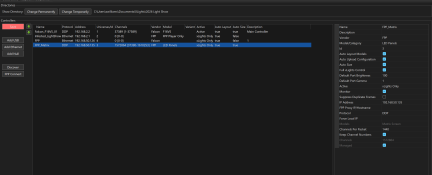
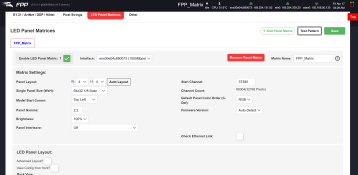
I've followed a YouTube video by Greg Macaree, but I've not been as successful as he has been in the video. Throwing a few screenshots below...

So what I've done so far is...

  • Configured the new FPP on a Pi4 (I set this FPP instance to Remote instead of Player)
  • Configured the P5 matrix in the Output Settings tab of FPP
  • Configured the P5 matrix in Xlights and through it up on my layout
  • Added the 2nd Pi4 to Xlights (this is the FPP_Matrix line)
  • I've not done anything in LED Vision yet as it wasn't in the YouTube tutorial and I need to get anything PC (not my work one) setup with that software
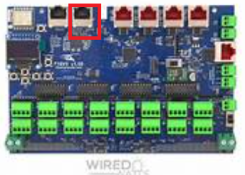
  • I have an ethernet cable running from the Pi4's USB dongle (gig speed CAT) to the Colorlight card
  • I have the onboard ethernet run between the Pi4 and the passthrough connection on my F16

Obviously I'm not doing something right since I can't reproduce the results I've seen in tutorials. Anyone want to point out the error of my ways?
I should have time to get LED Vision up and running later today, but my understanding from what I've watched is LED Vision isn't required to run simple patterns from Xlights to the matrix (maybe I'm mistaken?).

Thanks guys, always appreciate the help! Let me know if there's other screen scrapes you'd like me to post.

1776414350205.png

1776414572471.png
1776414728201.png
 
Back
Top