Wiring backup data pin question

BigRedNole

Apprentice elf
Joined
Dec 6, 2016
Messages
65
Location
USA
This may be a completely stupid question, but it will be something I am running into when my parts get here in the next couple days/weeks. I have sets of led strip lights that have the 2-data pins (V+. D1 D2, V-). My question is how to I manage the 2-Data pins when my controller has 3 outputs? I am guessing I just connect the single data to the D1 and D2 pins on the led strips.
 
Keep in mind Rob's (correct) advice will _not_ reduce the redundancy capability of the strip; the only issue it will cause is if the wire from your controller to first pixel were to fail, you'd lose the strip. All other redundancy from Pixel 1 onwards will work perfectly. (including a failure of pixel 1)
 
How to deal with the backup data wire may depend on the exact pixel type.

I saw a Ray Wu seed pixel listing just the other day that advised to connect the 2 data wires together at the source.
I wouldn't trust the vendor, I trust the data sheet.
One prominent vendor kept advocating for tying the two data lines together on their GS8208 pixels, arguing it wouldn't work if you didn't based on what their Chinese vendor had said.
Then the data sheet was presented to them showing the correct way to wire them and they suddenly changed their tune.
 
I may be over thinking this and partly because I just ordered a bunch of stuff. One thing I ordered was WS2815 led strips. These have the 4 input/output. I was simply trying to figure out how to take a 3-core XConnect pigtail to make it work. The reality is I should get 4-core XConnect pigtails to make life easier?

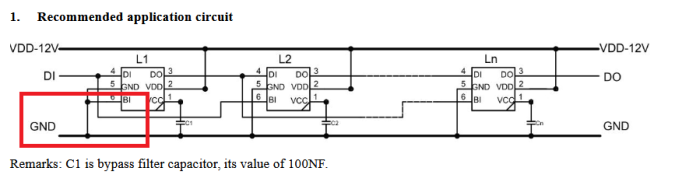
Tie 2 cores to ground, 1 to data, and one to V+. The second ground will tie to the second data input on the led strip.
 
Standardise on 3 pin pigtails. It'll make your job so much easier getting extensions and the like.

On the input/male connector - tie Ground to Strips Ground & Backup data in. Data to Primary Data in, Positive to positive
On the output/female connector - tie Ground to Strip Ground, Data wire to Primary Data out, and Positive to positive. Leave Backup Data out disconnected.
 
A downside to 3-pin pigtails is that you'll lose data backup between two separate strips (assuming both strips are 4-wire with data backup). Perhaps you are fine with this compromise?

I did have Ray attach 3-pin pigtails when I bought GS8208 strip from him back in 2018. Both DI2 & DO2 at each end were left disconnected. In my case this hasn't seemed to matter as the strip works great, despite the datasheet advising differently. I've not yet had a pixel failure on this strip though. YMMV. This strip is permanently mounted around my windows.
 
A downside to 3-pin pigtails is that you'll lose data backup between two separate strips (assuming both strips are 4-wire with data backup). Perhaps you are fine with this compromise?

I did have Ray attach 3-pin pigtails when I bought GS8208 strip from him back in 2018. Both DI2 & DO2 at each end were left disconnected. In my case this hasn't seemed to matter as the strip works great, despite the datasheet advising differently. I've not yet had a pixel failure on this strip though. YMMV. This strip is permanently mounted around my windows.
Thank you. Just trying to figure things out in my head waiting for parts to get here. The strips are for arches at ground level. If I only use the 3-wire approach on the WS2815 strip, it is V+, Data In, V- (Just ignore the Data Backup connection). Just daisy chain the arches together this way. If there is a failure, swap out the faulty strip and things should be back to normal. The price I got for 4 sets of strip was great and these are twice the size I need. So I will have spare strips in case of failure.
 
Basically yeah. And the issue only happens if you lose the last pixel in the previous prop, or the cable linking the props. All other pixel failures will be covered as on the strip it's still all four-wire.
I would ground the backup in on the start of the strand though. That way it 100% forces it as 'not valid' pixel data, so it wont ever try to switch over to it:

From the WS2815 data sheet-
1736078392456.png

Essentially the Backup out at the far end of the strip would be unused (it connects to DO of the second last pixel and DI of the last pixel)
 
Basically yeah. And the issue only happens if you lose the last pixel in the previous prop, or the cable linking the props. All other pixel failures will be covered as on the strip it's still all four-wire.
I would ground the backup in on the start of the strand though. That way it 100% forces it as 'not valid' pixel data, so it wont ever try to switch over to it:

From the WS2815 data sheet-
View attachment 28414

Essentially the Backup out at the far end of the strip would be unused (it connects to DO of the second last pixel and DI of the last pixel)
Hi everyone just joined today as I have been having some challenges with these 4 pin ws2815 pixel and this is the only post I found that tries to somehow address this my challenge.

Firstly I make my own props. Some end up having even pixel numbers and some odd using ws2815. For all my props I have been connecting the backup in to ground at start and at then end.

Now after each prop is made I test them just with wled. I light up 4 pixels and long behold sometimes 5 pixels light up. If I connect a prop behaving like this to another then 2nd props first pixel lights up and I lose one pixel. This issue took me ages to isolate. First time this happend I thought I had a bad pixel. I went through chopping pixel to find out the bad one and none were bad.

Then as I was experimenting I connected the data in to ground at start and backup to data in and everything started working. i.e I set 4 pixels on wled 4 pixels lit up. This then made me think that there are 2 different types of chips in these seeds and if you join two of the same chips together I have this issue.

Now whenever this issue happens I connect data in to ground at start.

However as I have so many props I can't chop and change which prop plugs in to which. Some are odd pixels some are even.

I don't know if any of this made sense but there has to be a more uniform approach to this.

Thanks for reading about my challenge with ws2815s :(.
Sam
 
Now whenever this issue happens I connect data in to ground at start.
That's because it's actually backup data in ... as you've noticed there are 2 kinds of chips to make it easier to solder and the backup data and data in swap places every other chip. (Sometimes they are nice enough to make some chips green on the back and the others black, but not always). @Skymaster has a really nice diagram of this.
 
@Skymaster has a really nice diagram of this.
The post is here :)
 
The post is here :)
Ok wow thanks guys..much appreciated. This is soo much trouble then what these 4 wire seeds promise. From now onwards I will be buying 3 wire seeds and replacing a pixel if it dies. I think this is is sooo much more efficient.

As i have some spare 4 wire...Is there any way I can bypass this? Will joining data in and backup in together at both ends be a workaround or will I still have the issue.. thanks
 
Last edited:
Hey Sammy. For my custom ones -- I just connected some clips to a connect input and then in my test bench WLED I lit up pixel 1 in Red, 2 in Green, 3 in Blue. Then I could quickly check If I got all three colours lighting up (aka - I was connected to Data-In) or if I only got 2 (I was connected to Backup In).
One thing I also found was that the lights would fail over from Data to Backup. But it wouldn't fail-back if I reconnected the data stream.

Once I'd identified which was data and which was backup - I just joined them to the correct place.

(On a seperate note - welcome to ACL. Where in Vic are you? Always keen to try and visit some new places (especially if you have custom seed pixel props)
 
Back
Top