Gooliez
Apprentice elf
Hi Guys, now i'm sure you'll love my awesome photoshop skills, so bare with me. lol
So i have a Laser Cutter with a 600 x 400 bed, I'm looking at making these custom matrix panels that support a 100 Pixels. So it will be a 10 x 10 grid with a 35mm spacing between Pixels. I got the idea from a post from a couple of years go on here, (Thanks "Stooged" if you are still about)
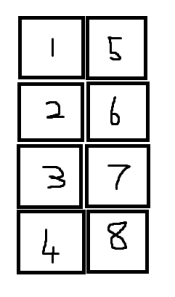
Overall i had to redesign these to fit in the specific spots on my house. Now on one side of a garage door i can fit 4 panels vertically, which is easy enough to put into Xlights, but i'm not sure what the best way to program the left hand side which can fit 8 panels like in my awesome drawing.
whats the smartest way to put this in?
I'm thinking I have 2 x Vertical runs and just place them next to each other?
so, 1,2,3,4 is one port and 5,6,7,8 is on a second port ( i'm getting the Baldrick 8 port and can support 750 pixels so cant do all 8)
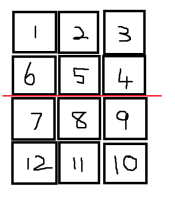
There will also be another Matrix using this modular system, but larger, it will be 12 panels (3 across x 4 down ), so i'm thinking doing it the same way with 3 ports? is there a way to reduce this to 2 ports eg 600 pixels i'm not sure how to program it into Xlights.
Thanks
So i have a Laser Cutter with a 600 x 400 bed, I'm looking at making these custom matrix panels that support a 100 Pixels. So it will be a 10 x 10 grid with a 35mm spacing between Pixels. I got the idea from a post from a couple of years go on here, (Thanks "Stooged" if you are still about)
Overall i had to redesign these to fit in the specific spots on my house. Now on one side of a garage door i can fit 4 panels vertically, which is easy enough to put into Xlights, but i'm not sure what the best way to program the left hand side which can fit 8 panels like in my awesome drawing.
whats the smartest way to put this in?
I'm thinking I have 2 x Vertical runs and just place them next to each other?
so, 1,2,3,4 is one port and 5,6,7,8 is on a second port ( i'm getting the Baldrick 8 port and can support 750 pixels so cant do all 8)
There will also be another Matrix using this modular system, but larger, it will be 12 panels (3 across x 4 down ), so i'm thinking doing it the same way with 3 ports? is there a way to reduce this to 2 ports eg 600 pixels i'm not sure how to program it into Xlights.
Thanks