Baldrick 8 & FPP Proxy setup issue

PixelProject

New elf
Joined
Jun 1, 2026
Messages
21
Good Afternoon All,

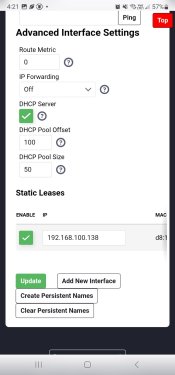
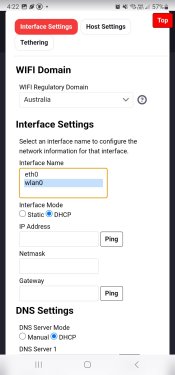
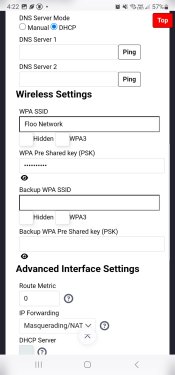
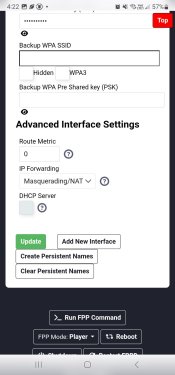
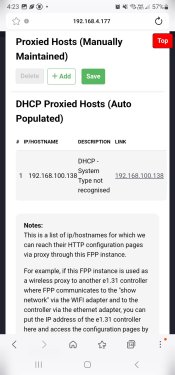
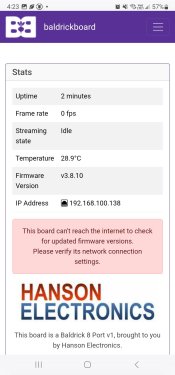
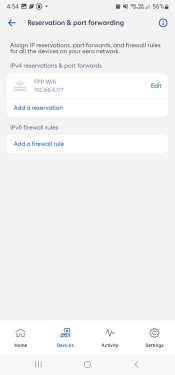
As a new comer setting up for their first Christmas show this weekend I have come across an issue in the last week of playing around and testing, up until Frida past I every time I tuned the control set up on the IP addresses had been stable and always the same on the baldrick and FPP, now every time I turn it on its different, So I set up the static addresses following the details in Greg Macarees videos on YouTube but now I have no connectivity for the baldrick to the internet and FPP seems to take too long to start up so the Baldrick controller isn't connecting. Running a Pi4 2Gb on FPP 9.4. Any assistance would be greatly appreciated. I think my hair has started falling out at an increased rate this week.
 
FPP is connected to the network wirelessly
Router 192.168.4.1
FPP 192.168.4.177
Baldrick 192.168.4.173
 
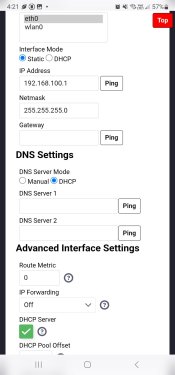
FPP has two addresses? ETH0 and wlan0? Having them both at 4.x addresses might be a bit of problem. Typically when using FPP wirelessly, you would setup a show network on a different subnet.
Is FPP connected directly to baldrick or there is a switch involved? Is the switch "on the home network" or is it dedicated for lights?
 
FPP has two addresses? ETH0 and wlan0? Having them both at 4.x addresses might be a bit of problem. Typically when using FPP wirelessly, you would setup a show network on a different subnet.
Is FPP connected directly to baldrick or there is a switch involved? Is the switch "on the home network" or is it dedicated for lights?
There was / could be a switch involved, I thought initially because the switch is dedicated to the lights an not connected to the home network it might have been the thing causing the problem. I'll double check the settings and provide screen shots tonight once I get home
 
FPP has two addresses? ETH0 and wlan0? Having them both at 4.x addresses might be a bit of problem. Typically when using FPP wirelessly, you would setup a show network on a different subnet.
Is FPP connected directly to baldrick or there is a switch involved? Is the switch "on the home network" or is it dedicated for lights?
 

Attachments

  • Screenshot_20261110_162150_Samsung Browser.jpg
    Screenshot_20261110_162150_Samsung Browser.jpg
    150.1 KB · Views: 9
  • Screenshot_20261110_162156_Samsung Browser.jpg
    Screenshot_20261110_162156_Samsung Browser.jpg
    142.8 KB · Views: 8
  • Screenshot_20261110_162217_Samsung Browser.jpg
    Screenshot_20261110_162217_Samsung Browser.jpg
    162 KB · Views: 7
  • Screenshot_20261110_162238_Samsung Browser.jpg
    Screenshot_20261110_162238_Samsung Browser.jpg
    162.7 KB · Views: 6
  • Screenshot_20261110_162243_Samsung Browser.jpg
    Screenshot_20261110_162243_Samsung Browser.jpg
    160.3 KB · Views: 6
  • Screenshot_20261110_162308_Samsung Browser.jpg
    Screenshot_20261110_162308_Samsung Browser.jpg
    199.9 KB · Views: 10
Continued
 

Attachments

  • Screenshot_20261110_162317_Samsung Browser.jpg
    Screenshot_20261110_162317_Samsung Browser.jpg
    172.9 KB · Views: 2
  • Screenshot_20261110_165404.jpg
    Screenshot_20261110_165404.jpg
    100.7 KB · Views: 2
Hey PixelProject,

If you get the Baldrick Buddy app (http://baldrickboard.com/buddy) it will scan your Baldrick and FPP settings and workout where the mismatch is for you and let you know :)
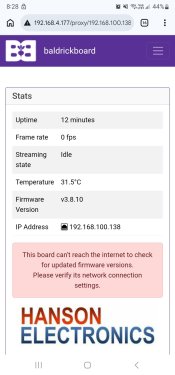
Thank you, I followed the advice and updated FPP to the latest version and I'm still not getting the baldrick to connect to the internet
 

Attachments

  • Screenshot_20261110_202856_Chrome.jpg
    Screenshot_20261110_202856_Chrome.jpg
    168.8 KB · Views: 5
if you could put a support ticket in via Baldrick Buddy in settings then help, it will send me all your settings and I can work out what's going on :)
Thank you kindly. I downloaded the app raised a ticket and in no time I had an answer, and now everything is as it should be.
 
Back
Top