5 in a row create sequence

Ben10

New elf
Joined
Dec 13, 2020
Messages
4
Hello guys,

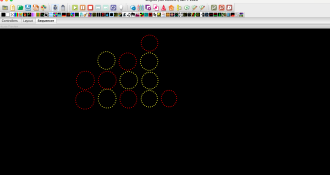
I have a decorative metal wall fitted with LED rings (26 Leds) ; the look is similar to the game 5 in a Row.

I would now like to create a sequence for it, but that's where the problems start.
The ring should visually move downwards, but I can't find a suitable effect; single strand comes closest, but it doesn't remain a circle.

The rings are each configured as a ring in xlights, a total of 20x and joined vertically in 5 groups.

When 4 rings are reached in the vertical, horizontal or diagonal direction, they should then blink and the sequence should end with glittering downwards.

The project is for the whole year.

I hope someone can help me.

Best regards
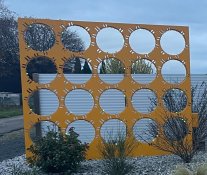
5 in a row.jpg
 
Some idea of how you have it modeled will help.
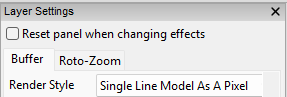
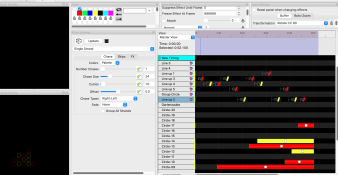
Under the layer settings the render style "single line model as pixel" could do what you want with a single line effect.
1769947731032.png
 
Outline of what I recommend:
1. Create submodels for each of the rings
2. Make groups of submodels, including ones that go down the columns
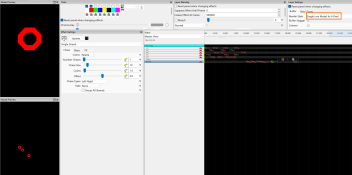
3. Use effects against the groups, that treat each model in the group as a "pixel" (see screenshot)

This will take some experimentation to get the effect you want. Some examples for you are in the zip below:

View: https://drive.google.com/file/d/1a19l-19w9YJwP__7eyXlxnIqqBgZq_OP/view?usp=sharing


You could also just apply effects to each submodel directly, really depends on what you are after as far as the sequence goes. You can make fun static sequences this way, but if the goal is interactive play, you're looking at overlays or a different software to control it altogether.

If you never want the lights to be independently controlled, you could wire it for that... but I'm assuming you'd want to do effects that go around the rings when someone wins, that sort of thing.

1769948574929.png
 
Thanks for your help, I experimented a bit and finally got the single strand effect to slide vertically and then fix the color at the end with "on".

I'm still looking for a suitable effect to showcase the four matching stones; I'd like to finish with Garland, which ends at the bottom.

I would be grateful for creative ideas.

I'd like to mention that I'm not very experienced with Xlights, even though I've done a few small projects, but they have nothing in common with the amazing shows here.

Therefore, please keep your explanation as simple as possible.

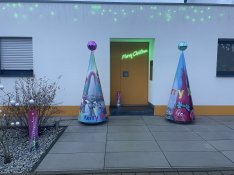
My last project didn't have much to do with Xlights, except for the 9 mini RGB LED spotlights that I equipped with a chip to control them individually. The cone is motorized and rotates, and the disco ball is also motorized and rotates in the opposite direction. The layout is entirely my own design; only the printing was done professionally.


Bildschirmfoto 2026-02-01 um 18.40.05.pngIMG_7010.jpegBildschirmfoto 2026-02-01 um 19.29.28.png
 
Last edited:
Back
Top