Configuring floods

aimbrunone

Apprentice elf
Joined
Jan 19, 2024
Messages
78
Having some issues configuring the 4 channel flood from your pixel store. https://yourpixelstore.com/product/pre-sale-add-on-floodlights-ws2811-rgbuv/

Not sure if their instructions are the best way to set up in xlights. I was told to set up as two separate props. One as the uv and one as the rgb. Thought it was working correctly but on second look, it’s not.

Has anyone used these and can give any advice?

Thanks
 
An RGB model followed on the same port by a single node for the UV is certainly one way to do it. I'd be curious to see the details of the setup, maybe there is just a small thing wrong with it.

The other way to do it is to use one flood model, set the RGB channels, create submodels for the UV or other special features, and group those. Then it does work normally in effects, and if you want to sequence the other channels you can still do that on a separate group.

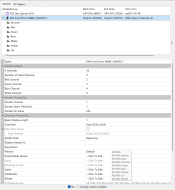
1794189524882.png
This one's DMX but I don't think it matters.
 
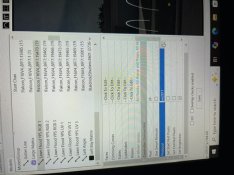
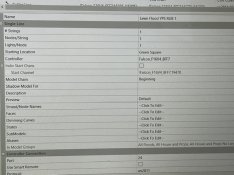
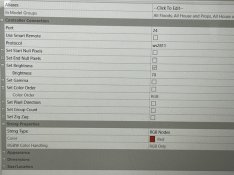
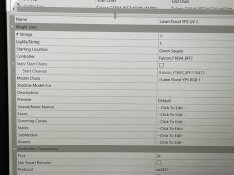
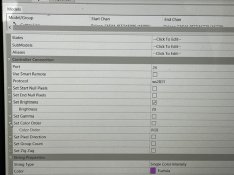
Thanks for your fast reply. Here are few shots of the set up.
3 pics for RGB 1 Set U

IMG_9749.jpegIMG_9750.jpeg

IMG_9751.jpeg

2 pics for UV1
IMG_9752.jpeg

IMG_9753.jpeg
 
Thanks for the help. If I put a simple "on" effect in xlights, the colors are off. If I put in RED, the actual flood shows the UV. If I put in GREEN, the flood shows RED. If I put in BLUE, flood shows GREEN. I tried turning the UV Prop OFF so that it wouldn't confuse with the RGB. Still didn't work. My guess is it's something in the configuration.

I appreciate the help
 
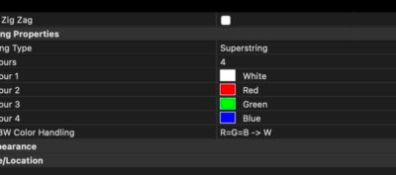
OK, when I look at the listing it is showing that channel 1 is UV, 2 is Red, 3 is green, 4 is blue. This lines up with what you are saying. So the first thing to do is move the UV node before the RGB node.
1794444275935.png
 
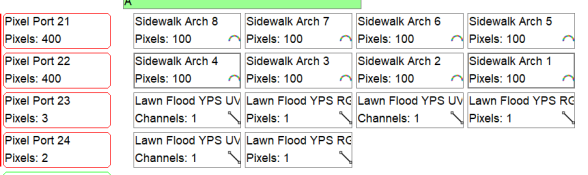
Ok...Starting to get somewhere. The few additional questions then would be, do I make the UV first before the RGB in the Master view? Would this then make it in the correct render order? Also, do I put the UV first on the visualizer? What about my flood groups? Does it matter how those props are listed in the groups? I have three lawn floods (these are the UVRGB) and then I have 4 RGB on my roof.
 
The UV should be first in the channel order. That is, when you put the models on the controller, the UV should go first on the port, followed by the RGB part. This is doable in the visualizer, take the UV block and drag it to the left edge of the RGB block, and it should insert the UV before the RGB.

It does not matter in the master view, that controls the render order and which effects overwrite the others.

The groups also do not matter.

This is all about which order the data is sent on the wire, it has to be UV, R, G, B, so putting UV before RGB on the controller port should do it.
 
Whose idea was this to make lights dance to music?!??! LOL Ok. So, I can get two of the three to respond correctly with the correct colors. The one that is not responding correctly, is the second flood on that port. Brightness was at 70%. I lowered to 50% thinking that maybe it was some sort of data issue. That didn't work and in the process, without making any other changes, none of them worked correctly! I'm now wondering if maybe water got in or I have a bad connection somewhere.
 
Ok....No water. My first flood (on it's own port) works just fine. My second and third floods that are on the same port do not display correct colors. Flood 3 is connected first to the controller and then flood 2 is connected to flood 3. Here is what happens when I output to lights.

Flood 2:

I select UV and it looks GREEN
I select RED and it looks BLUE.
I select GREEN and nothing lights.
I select BLUE and nothing lights

Flood 3:

I select UV and it looks UV
I select RED and it looks UV
I select GREEN and it looks GREEN..Yeah!
I select BLUE and RED lights up on Flood 2.

Again, I have these set up as two props. UV is the first prop and then the RGB is the second. This is how I have it set up in the visualizer.

Any other thoughts?

Thanks again!
 
Back
Top