FPP Not Liking WLAN

DinoChickenSuit

Huuuuuuge Nerd
Joined
Oct 27, 2025
Messages
33
Hi all.

I finally started going the "proper" way of xLights control and bought myself a pi 4b.

Loaded it up with FPP, got a Baldrick 8 working following this video:


View: https://www.youtube.com/watch?v=rte1jbS5DHw


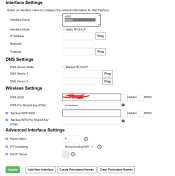
Now, I turn it on, and nothing through WiFi. No sign of FPP in xLights, or though the ip address. No 'FPP' WiFi network. It will only work if i plug the Pi into the router.

What do I do?
 

Attachments

  • 1767669183133.png
    1767669183133.png
    71.9 KB · Views: 15
  • 1767669232647.png
    1767669232647.png
    69.1 KB · Views: 15
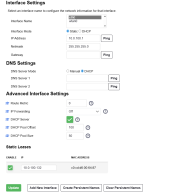
You have a static address assigned for Eth0 - is this on the same subnet as your wlan0 as well? It seems that would be the case if you're able to access FPP using that IP address when plugged into your home network
If so - that's the problem - they need to be on different subnets.
Change eth0 to 10.0.200.1 for example (instaed of 100) and use that for your show network
 
What version of FPP are you using as the above video will need 9.4 as threre were problems with the eailer version and don't forget you router might change the WIFI IP address if it being a while since you ran FPP so use xScanner under tools in XLights to find the IP address of FPP
 
The newest version of FPP and xLights

This is the first I’m set it up, so it shouldn’t have an IP problem, right?
 
Last edited:
Sounds like a good one to jump on the zoom room for. Namely because there are a load of factors and investigations that need to be done on both FPP and the PC/Network in one go.
 
Is the Pi4 mounted in a metallic case?
I have a similar issue with my Pi4. Onboard Wi-Fi works with a bare board, but not when mounted in its case (metallic).
I needed to add a USB Wi-Fi dongle. And if I remember correctly there was a bit of fiddling around as the onboard Wi-Fi seemed to want to keep priority.
 
Back
Top