Intro
Hi everyone, I’ve been working on a new browser-based xModel design app called Aussie Pixel Studio and wanted to share it here. It’s meant to make pixel prop layout and wiring visualization easier, especially for folks who want a more visual CAD-style workflow than the usual spreadsheet/grid-based xModel editors.
What it is
Aussie Pixel Studio aims to be a lightweight web app for designing xModel pixel props. It focuses on:
How it works
What’s working now
What is still “in progress”
Some features are currently locked as work-in-progress while I decide the best user-facing workflow. That means:
What I’m looking for
Feedback would be especially helpful on:
Final note
This is an early app, but it’s already usable for basic designs and xModel export. I’m iterating on the locked features and would love input from the community for anything I've missed, or lacking.
Link
https://aussiepropstudio.daveshotit.com/
Screenshots
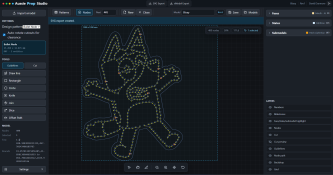
Hi everyone, I’ve been working on a new browser-based xModel design app called Aussie Pixel Studio and wanted to share it here. It’s meant to make pixel prop layout and wiring visualization easier, especially for folks who want a more visual CAD-style workflow than the usual spreadsheet/grid-based xModel editors.
Aussie Pixel Studio aims to be a lightweight web app for designing xModel pixel props. It focuses on:
- visual node placement
- wire/connectivity layout –(only basic at the moment)
- xModel import/export compatibility
- Open the app in your browser
- Import a background image or several as reference
- Import an existing .xmodel file to modify or start a new prop design
- Use the canvas tools to place pixels/nodes and draw pathing
- Use the Pattern tools to lay down nodes across the drawn paths etc
- Adjust spacing, node order, and visual layout
- Export the finished design back to .xmodel
- Core visual layout and editing
- Pixel node placement
- Node Spacing both too close and to far warnings (adjustable)
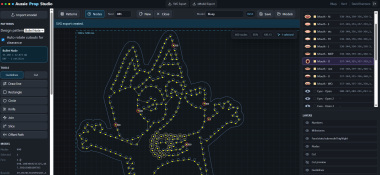
- Wiring / connection visualization including warnings for wiring jump maybe required (default is 60mm)
- Faces / States / Sub Models with visualization and default colours where xLights allows it
- Milestone Nodes – adjustable highlight Nodes every ## for wiring/counting when pushing
- xModel import/export
- Zoom, pan, and selection tools
- Backdrop import flow
- Visualization of the cut holes off pre-defined bullet pixel hole
- xModel Export, which tries to minimise the xLights grid size required to maintain design details
- Ability to save model, and update later as a Rev up vs just overriding completely
Some features are currently locked as work-in-progress while I decide the best user-facing workflow. That means:
- advanced tools are visible but not yet fully functional
- Multiple node templates to possible swap to seeds/other pixel shapes
- the UI for some workflows is still being finalized
- I’m still deciding how to expose certain options without making the app too complex
- Wiring Currently takes the shorted path, which means on some alternating node patterns the wiring is overlapped.
Feedback would be especially helpful on:
- whether this feels easier than existing xModel editors
- any bugs, issues found.
- any must-have workflow for common prop types
This is an early app, but it’s already usable for basic designs and xModel export. I’m iterating on the locked features and would love input from the community for anything I've missed, or lacking.
Link
https://aussiepropstudio.daveshotit.com/
Screenshots