FPP Not Liking WLAN

DinoChickenSuit

Huuuuuuge Nerd
Joined
Oct 27, 2025
Messages
38
Hi all.

I finally started going the "proper" way of xLights control and bought myself a pi 4b.

Loaded it up with FPP, got a Baldrick 8 working following this video:


View: https://www.youtube.com/watch?v=rte1jbS5DHw


Now, I turn it on, and nothing through WiFi. No sign of FPP in xLights, or though the ip address. No 'FPP' WiFi network. It will only work if i plug the Pi into the router.

What do I do?
 

Attachments

  • 1767669183133.png
    1767669183133.png
    71.9 KB · Views: 18
  • 1767669232647.png
    1767669232647.png
    69.1 KB · Views: 18
Oh, and if I disconnect the ethernet cable AFTER its booted and connected, it works through WLAN...
 
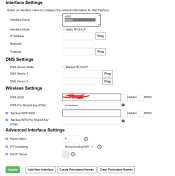
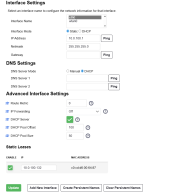
You have a static address assigned for Eth0 - is this on the same subnet as your wlan0 as well? It seems that would be the case if you're able to access FPP using that IP address when plugged into your home network
If so - that's the problem - they need to be on different subnets.
Change eth0 to 10.0.200.1 for example (instaed of 100) and use that for your show network
 
What version of FPP are you using as the above video will need 9.4 as threre were problems with the eailer version and don't forget you router might change the WIFI IP address if it being a while since you ran FPP so use xScanner under tools in XLights to find the IP address of FPP
 
The newest version of FPP and xLights

This is the first I’m set it up, so it shouldn’t have an IP problem, right?
 
Last edited:
Sounds like a good one to jump on the zoom room for. Namely because there are a load of factors and investigations that need to be done on both FPP and the PC/Network in one go.
 
Is the Pi4 mounted in a metallic case?
I have a similar issue with my Pi4. Onboard Wi-Fi works with a bare board, but not when mounted in its case (metallic).
I needed to add a USB Wi-Fi dongle. And if I remember correctly there was a bit of fiddling around as the onboard Wi-Fi seemed to want to keep priority.
 
Sorry, haven’t been on in a few days.

Is the Pi4 mounted in a metallic case?
No, I’ve tried it on a wooden desk, a wooden floor, and in a 3d printed case. No luck

And if I remember correctly there was a bit of fiddling around as the onboard Wi-Fi seemed to want to keep priority.
Could you elaborate on this? That might be the problem
 
Sorry missed your reply.
wlan1 (external usb) is set up fully to connect to the show network via wifi. With properly filled out fields.
(static ip, gateway, manual dns, ssid and password.) I use the 192.168.2. subnet for the show.

wlan0 (inbuilt) For this one I set up a fictitious wifi network. The static ip address was on a completely different and non existent subnet.
ie 192.169.4.50 and the gateway was left blank. I still filled in the manual dns fields .
for the wifi i just typed in a random fake ssid and psk and ticked hidden.
 
It was mentioned previously. wlan0 (connects to the home/show network) and eth0 (connects to the controllers) must be on different subnets.
Gateway configured on the wlan0 port but left blank on the eth0 port.

If you are using dhcp for your wifi the ip address will periodically change. If you have been rebooting fpp in quick succession the ip address reassignment can occur straight away. ip addresses can be reserved in the router if you want to continue with dhcp. (did this for a kasa smart plug).

Although other methods have been mentioned, i prefer to log into the router to check the connected devices and see their ip addreses.

I am only using the second wifi unit as I happened to buy a metallic pi enclosure. Which I kept as the pi is out in the open and not mounted in a controller enclosure. Quickly found that for some reason wlan0 was useless when the pi was in the metallic enclosure. Worked fine on the bare board though (which was not practical for my situation).

To give access to the controller boards (from the home/show network) I went old school and used a static route table in the router
 
Back
Top